E2E Testing with Playwright: Reliable UI Automation for Web Apps
Choose valuable E2E flows, write resilient Playwright tests, manage test data and diagnose CI failures without building a brittle test suite.
Published: · Updated:
 © Velvionix
 Small product teams often notice regressions only when a critical user path breaks in production. Then the question is rarely “Do we have enough tests?” and more often “Are we actually testing the right flows automatically?”
E2E testing with Playwright checks exactly those paths through the interface. It does not replace unit or integration tests. It shows whether login, booking, saving data or another business-critical flow still works for users.
Key takeaways
E2E testing checks user journeys, not as much surface as possible
An end-to-end test simulates a relevant user or system journey across several layers: browser, frontend, backend, often also auth and persistent data. Not every business rule belongs there.
Valuable flows are those with clear harm if they break unnoticed: login and permission, checkout or booking, the application’s core workflow, saving or changing critical data.
The test pyramid still holds. Fast unit and integration tests carry the volume. E2E tests cover a small number of complex but particularly important user journeys. Anyone who pushes every detail into the UI suite pays in runtime and upkeep.
A lean QA process helps with the choice. The article QA process for small teams places risk, release and automation as one building block. Here the focus is implementation with Playwright.
Why Playwright is interesting for modern web apps
Playwright automates real browsers. It brings modern locators, auto-waiting and actionability, web-first assertions, isolated browser contexts, traces and a clear CI path. Several browser engines are possible.
This is neither a benchmark nor a claim that Playwright is the best tool. It explains why teams choose Playwright for UI automation when they want to protect web applications against regressions in the user interface.
Choose risks and critical flows first, then automate
Before the first test is written, business impact, usage frequency, change frequency, likelihood of failure, repeatability and testability should be assessed.
Do not automate everything. A flow that changes hard every week, or depends on a third-party system the team does not control, often creates more noise than protection.
If priorities and testability are still unclear, QA consulting is a more sensible starting point than immediately building a large test suite.
Stable locators instead of DOM chance
Playwright recommends locators based on what users see: roles, labels, visible text and, where necessary, stable test IDs that serve as a defined interface between the product and the test.
Long CSS or XPath chains find the element through the HTML nesting, not through what the user sees. If an element is only nested differently, the test turns red even though the flow still works.
Accessibility and testability can complement each other because clear roles and labels benefit both. Playwright testability still does not guarantee accessibility.
Auto-waiting does not replace a weak test architecture
Playwright waits for actionability before it clicks or types. That does not replace control over data and state.
Manual sleeps can be avoided when the test waits for real states and assertions. Timeouts should not be the default repair for flakiness. If a test only turns green with waitForTimeout, the condition is unclear, not the browser too slow.
Test isolation and test data decide reproducibility
Tests should run independently. Playwright isolates runs through their own browser contexts. Defined test accounts, reproducible initial states and clearly established processes for cleaning up or seeding test data are all part of this.
The exact shape depends on the system: fixtures, reset APIs, dedicated data per run. There is no universal architecture. Without isolation, every failed test can turn into detective work caused by leftover state from other tests.
CI: failures must be explainable
The suite should run on pull requests or at another pipeline stage that fits the team’s workflow. Not every E2E suite has to run fully on every commit if cost and runtime do not allow it.
Regardless of the setup, reports, traces and screenshots should make it possible to quickly analyze a failed flow. Stability comes before maximum parallelisation.
Retries: a diagnostic aid, not a place to hide flakiness
A retry can make a transient error visible. A test that only turns green on the second or third attempt is not reliable. “Flaky but green” is an open risk.
The cause should be fixed, and the trace viewer should be used to see why the test failed. A retry should not become the lasting substitute.
What should deliberately not be automated as an E2E test
Not every check belongs in the E2E suite. These cases are better kept at a lower test level:
- Logic that can be checked faster and more stably as a unit or integration test.
- Volatile experiments without a stable expected value.
- Unimportant cosmetic details.
- Third-party areas the team does not control, unless there is a clear integration purpose.
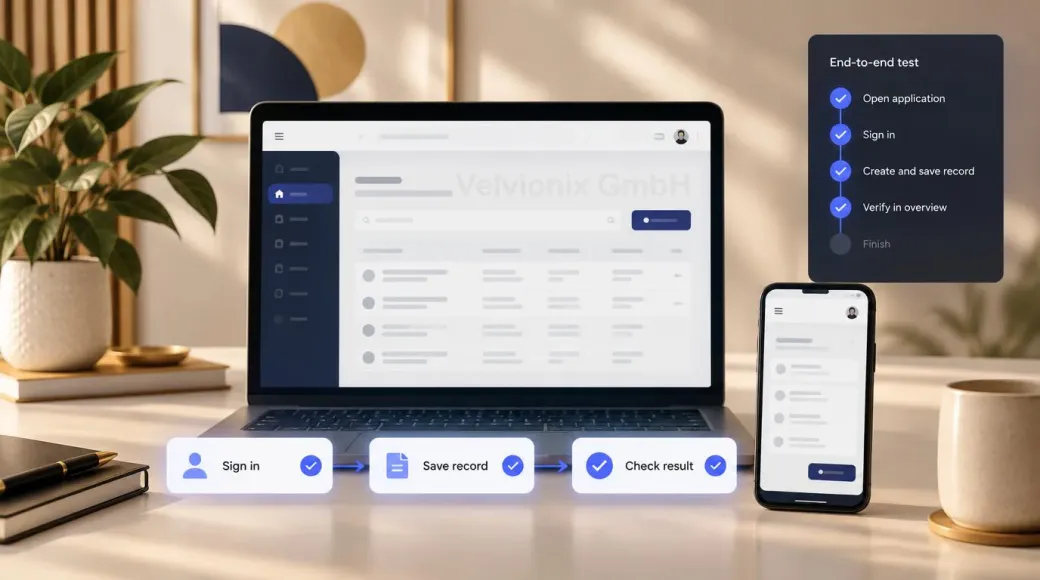
A practical example: a critical user flow
Imagine a web app in which signed-in users create or change a business-critical record.
A sensible E2E test could look like this: sign in, create or modify a record and then verify the resulting status. Cover role and error cases separately instead of dragging one giant test through every variant.
The value comes from keeping the scope narrow: one flow, a clear expectation and reproducible data.
The real cost: E2E suites need care
Test data, selectors, environments, changing flows, CI runtime and the analysis of failed tests remain ongoing tasks. Test automation is a product component, not a one-off script pack.
Teams that underestimate this end up with a test suite they no longer trust. Then it is skipped, and the protection is gone.
Retries do not make an unstable test reliable
Frequently asked questions
What is E2E testing?
An end-to-end test checks a relevant user or system journey across several layers, usually through the user interface. It shows whether the flow still works as a whole.
What is the difference between E2E, integration and unit tests?
Unit tests check small units. Integration tests check how a few parts work together. E2E tests verify the visible flow from the user's perspective. E2E does not replace the other layers.
Why Playwright for UI test automation?
Because of locators, auto-waiting, isolated contexts, traces and CI support for web apps. This describes the tool's suitability for the task rather than comparing it with other solutions.
Which tests should be automated first?
The first flows to automate should be those whose failure would cause the greatest harm, that are used frequently and that can be tested reliably. The goal is not to cover as much of the user interface as possible.
How do you prevent flaky Playwright tests?
Stable locators, waiting for real states, isolated data, no sleeps as the default. Retries should be used to expose instability, not to hide it.
How do Playwright tests run in CI?
Playwright tests should run at the pipeline stage that fits the team and provide reports, traces and screenshots for failure analysis. The full suite does not have to run on every commit if runtime and cost do not allow it.
Can Velvionix review or extend an existing E2E suite?
In the initial technical consultation, we review the product, the existing tests and the user journeys that are particularly important to the product. QA consulting, a first Playwright module or both can follow. New test cases or new areas are commissioned separately.
Automate critical user journeys with intent
Once coverage, testability and priorities are clear, that can become a durable Playwright suite for the flows that actually matter. The frame is on E2E test automation. If prioritisation is missing first, QA consulting is the better next step.
Sources
Notice: The respective providers or operators are solely responsible for the content of external links.
- [1]
- [2]
- [3]
- [4]
- [5]
- [6]
- [7]
- [8]

Comments
No comments yet.
Be the first to comment!
Write a comment
To write a comment, please enable the comment function in your privacy settings.
Write a comment